Workflow Automation Explained: What It Is, How It Works, and Why It Matters in 2026
Workflow automation is software that completes tasks automatically using triggers, rules and actions, removing the manual handoffs between people and tools. Adoption is now mainstream - 66% of organisations have automated at least one business function - and the payoff is measurable: 25-30% productivity gains, 40-75% fewer errors, and ROI inside 12 months for 60% of them. This guide explains it in plain English, then shows how to put it to work.
Still Copying and Pasting Between Apps Every Day?
Picture the front desk at a busy clinic. A new patient inquiry comes in, someone copies the details into the calendar, someone else sends the intake form, a third person chases the insurance check. By lunch, half a day is gone to work no human actually needed to do. That is the tax service businesses pay every day - workers still lose about a quarter of their work week to manual, repetitive tasks, according to Smartsheet. Most guides on this topic are written for enterprise IT departments. If you run a clinic, law firm, agency, real estate team or accounting practice, you do not want to become an automation engineer. You want the result.
What Is Workflow Automation?
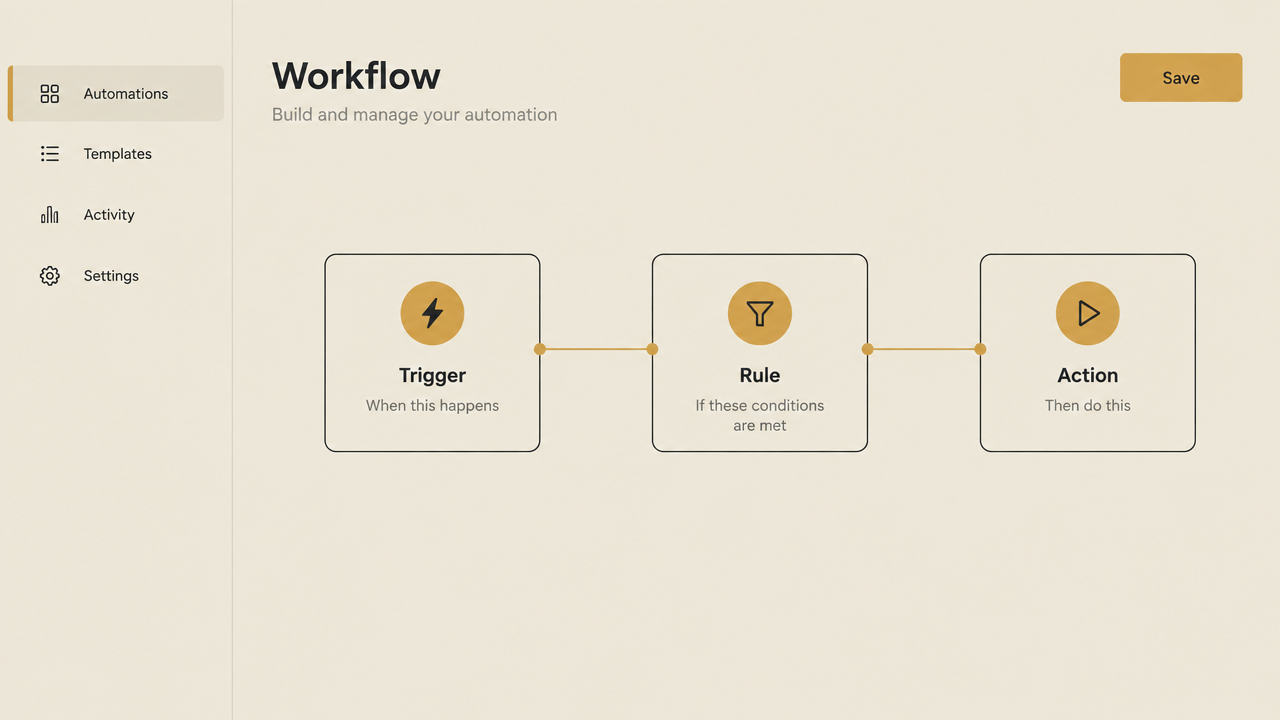
Workflow automation is the use of software to complete a series of tasks automatically, based on predefined rules, without manual input at each step. It replaces the copy-paste, notify and follow-up work people do by hand, routing information and completing actions on its own so processes finish faster and more consistently. The engine underneath is simple: something happens (a trigger), the system checks your logic (rules), and it completes the next steps (actions). Once you define that logic, it runs the same way every time. It helps to separate a process from a workflow. A process is a broad series of steps that achieve a business outcome, while a workflow is a part of that process. Client onboarding is a process; sending the welcome pack and requesting documents is a workflow inside it.
How Workflow Automation Works: Triggers, Rules and Actions
Workflow automation runs on a cycle of triggers, rules and actions. A trigger event starts the workflow, rules decide what happens next, and actions carry out the tasks. A real estate team could set it up like this: a lead fills in a listing form (trigger), the system checks the property type and budget (rules), then it adds the lead to the CRM, sends a tailored reply and assigns the right agent (actions). No one touches a keyboard. Typical triggers are a new form submission, a missed call or an invoice falling due. Typical rules route by lead type, value or urgency. Typical actions send the confirmation email, update the CRM and notify the right member of staff. Creative Hauz designs and deploys n8n workflow automation that connects the tools service businesses already use, so the whole trigger-rule-action chain runs as one production-grade system.
Workflow Automation vs RPA vs Process Automation
These three terms get mixed up constantly, so here is the clean version. RPA (robotic process automation) works best for structured, high-volume tasks like data entry - it mimics human clicks and keystrokes on a screen. Workflow automation manages complex, multi-step processes that involve approvals, logic and integrations across different systems, usually through APIs. Process automation is the broader umbrella that orchestrates entire processes end to end, across people and systems. Put simply: RPA copies what a person's hands do, workflow automation coordinates what a whole team does, and process automation covers the entire operation. For most service businesses, workflow automation is the sweet spot. Your bottleneck is rarely one repetitive keystroke - it is the handoffs between people, tools and steps.
What Does Workflow Automation Look Like in Practice?
The fastest way to understand workflow automation is to see it in your own industry. Clinics: a booking triggers the patient intake form, an insurance verification check and a reminder sequence, all sent automatically before the appointment. Law firms: a new matter submission triggers a conflict check, generates the engagement letter and logs key deadlines in the case management system. Agencies: a signed client triggers the onboarding checklist, tool-access requests and kickoff scheduling. Real estate teams: a new lead from a listing portal triggers a qualification sequence, a CRM entry and automatic agent assignment. Accountants: a client uploads documents and the workflow routes them, creates a review task and sends a receipt confirmation. Ecommerce sellers: an order triggers fulfilment, a tracking update and a post-delivery review request. These are not hypotheticals - in legal, workflow automation already handles billing, new client information, contract reviews and case deadlines, and healthcare providers use it for records, scheduling and billing.
Workflow Automation in 2026: The Numbers That Matter
Workflow automation is no longer an early-adopter bet. Adoption: 66% of organisations have adopted automation in at least one business function, up from 57% a year earlier (McKinsey). Wasted time: workers lose about a quarter of their work week to manual, repetitive tasks (Smartsheet). ROI speed: 60% of organisations achieve ROI within 12 months, with average productivity increases of 25-30% and error reduction of 40-75% compared with manual processing (Kissflow). Documented ROI: Forrester's 2024 Total Economic Impact study found a 248% three-year ROI for a composite enterprise deploying Microsoft Power Automate. Market size: the global workflow automation market stands at about $26.01 billion in 2026, growing toward $40.77 billion by 2031. Small businesses are catching up fast - 68% used AI regularly in 2025, up from 48% in July 2024 (QuickBooks).
Where to Start With Workflow Automation
Start by picking one high-friction process - the one that eats the most hours or causes the most dropped balls. Then choose your path based on how you want to spend your time. If you want to build it yourself, start with a DIY tool and automate that one process before scaling. n8n is powerful and code-friendly, with Starter at $20/month for 2.5K workflow executions; Make is the more budget-friendly option and easier for non-developers. Be honest with yourself: this route needs time to learn, test and maintain, and costs on tools like Zapier climb fast once you run a few thousand executions a month. It suits a solo accountant or a tech-comfortable operator who enjoys tinkering. If you want the outcome without the build, use a done-for-you partner who builds and runs the system for you. That is the fit for a clinic owner, law firm or agency lead with no time to learn a platform and no appetite for maintenance.
Frequently Asked Questions
What is the difference between RPA and workflow automation? RPA mimics human clicks and keystrokes on structured, high-volume tasks like data entry, while workflow automation coordinates multi-step processes with approvals, logic and integrations across systems. What is the difference between workflow automation and process automation? A process is a broad series of steps that achieve a business outcome; a workflow is a part of it. Process automation orchestrates the whole thing, workflow automation handles the tasks and handoffs inside it. What is an example of workflow automation? Client intake at a clinic: a booking triggers the patient form, an insurance check and a reminder sequence automatically. How does workflow automation work? Through a cycle of triggers, rules and actions - an event starts the workflow, rules decide what happens next, and the system completes the actions. What are the benefits? Speed, accuracy and capacity: 25-30% productivity gains, 40-75% fewer errors, and ROI within 12 months for 60% of organisations. What is the best way to start in a small business? One high-friction process first - build it on n8n or Make if you have the time and technical comfort, or use a done-for-you partner if you want the result without the learning curve.
Conclusion
Workflow automation is not an enterprise-only luxury. If your team loses a quarter of its week to manual, repetitive tasks, you are already paying the cost of not automating - you just pay it in wasted hours instead of software. The honest reality check: the tools are proven, but a good build takes real time to design and maintain. The genuine decision is not whether to automate, it is whether to build it yourself or have it built for you. Creative Hauz designs and deploys production-grade, done-for-you n8n workflow automation for clinics, law firms, agencies, real estate teams and accountants. The outcome is simple: more bookings, faster responses, and 15+ hours a week won back.