WhatsApp Business, WhatsApp Business API, and WhatsApp Chatbots Explained (2026 Guide)
There are three tiers here, not one product: the free WhatsApp Business app (one agent, no automation), the WhatsApp Business API (multi-agent, programmatic access), and WhatsApp chatbots, which only run on top of the API. Since July 2025 Meta bills per message - marketing $0.025 to $0.14, utility $0.004 to $0.05 - while the first 1,000 customer-initiated service conversations each month are free. Use the free app if you are solo; use the API with a chatbot when you need automation, multiple agents or 24/7 lead handling.
Still Copying and Pasting the Same Reply to 40 WhatsApp Messages a Day?
Your clinic receptionist answers "yes, we have Saturday slots" for the eleventh time before lunch. Your agency account manager toggles between three phones. Your law firm admin is still typing out the same intake questions by hand. WhatsApp is where your customers already are. The problem is that "using WhatsApp for business" quietly splits into three different things, and nobody tells you which one you actually need. So what is the API? Do you need a chatbot? Is any of it free? Let us untangle it in plain English - no jargon, no reseller sales pitch.
What Is WhatsApp Business? (The Free App, Explained)
WhatsApp Business is a free mobile app from Meta designed for small businesses to communicate with customers on WhatsApp. It adds a business profile, automated away and greeting messages, quick replies, and a product catalog on top of standard WhatsApp messaging. It is built for the solo owner or a very small team: you download it, verify your number, and start replying. That is the whole setup. But the free app has hard ceilings. It runs on one device with one agent at a time, it has no API access, and it cannot run a chatbot. As Sinch puts it: "Just answering customer chats? The app is enough." For context, over 200 million businesses use the free WhatsApp Business app. It is a genuinely good tool, right up until you outgrow it.
What Is the WhatsApp Business API, and Who Actually Needs It?
The WhatsApp Business API (now officially the WhatsApp Business Platform) is Meta's programmatic interface that lets businesses send and receive WhatsApp messages through software rather than a phone app. It powers chatbots, multi-agent inboxes, CRM integrations, and automated messaging at scale. You need it the moment you outgrow one person answering one phone - multiple people, systems or automation involved means you have outgrown the app. Access usually runs through a Business Solution Provider (BSP), which is faster and more practical for most businesses than going direct with Meta. Roughly 5 million-plus businesses now use the API, a small but fast-growing slice next to the 200 million on the free app. Here is the part the sales pages skip: the API is infrastructure, not a dashboard you open. Someone has to integrate it, design and submit message templates for approval, wire up opt-in and opt-out, and keep the number's quality rating healthy. That build-and-maintain burden is the real cost, and it catches most owners off guard.
 GIF
GIFApp vs API vs Chatbot: Which Tier Fits Your Business?
Think of these as a three-tier stack. The WhatsApp Business app is a free mobile app for a solo owner with one agent - no chatbot possible, no cost. The WhatsApp Business API is programmatic access through a BSP, suited to multi-agent teams, automation and CRM connections, priced per message plus a BSP fee. A WhatsApp chatbot is the AI or rule-based bot that sits on the API for 24/7 auto-response and lead qualification, costing the API charges plus the build or hosting. The relationship is vertical: a chatbot requires the API, the API enables the chatbot, and the app is a separate, simpler track that does neither. In practice, a solo physiotherapist is fine on the free app. A 10-agent real estate team needs the API so everyone works from one shared number. A law firm that wants intake answered at midnight needs a chatbot built on that API. There is no chatbot without the API.
WhatsApp Business API Pricing in 2026: What You Will Actually Pay
The direct answer: the API is not free, but a large chunk of your usage can be. Pricing changed significantly in 2025, so ignore any guide dated before then. On 1 July 2025 Meta retired conversation-based pricing and moved to per-message pricing, billing every delivered template message individually instead of charging once per 24-hour window. As of 2026 you pay per delivered template message by category, country code and monthly volume: marketing messages $0.025 to $0.14 each, utility messages $0.004 to $0.05 each, and service messages free when sent inside the 24-hour service window. There is real free volume too - the first 1,000 customer-initiated service conversations every month are free, globally, which covers most small support teams outright. But there are two layers to the bill: Meta charges per message, then the BSP adds its own fee on top, whether a fixed monthly fee, a per-conversation surcharge, or a mix. Now the mechanic that saves you the most money: the 24-hour service window. When a customer messages you, or replies to any of your messages, it opens a 24-hour window in which you can send unlimited free-form text, images and files without WhatsApp fees. Every new customer message resets the timer, so a long support thread can stay free for days. The one restriction: you cannot use that window to push marketing or authentication templates. For most service businesses the honest summary is this - your first 1,000 customer-initiated conversations per month are free on Meta's side, and your real spend is the BSP and the build.
 GIF
GIFHow WhatsApp Chatbots Work (and What They Can and Cannot Do)
A WhatsApp chatbot is software that reads incoming messages and replies automatically, either with fixed rules or with AI. Both types require the WhatsApp Business API to function - there is no free-app version. What a good chatbot can do covers most of the repetitive work: 24/7 auto-response, lead qualification, FAQ handling, appointment prompts, and clean handoff to a human when the question gets complex. What it cannot do is spam. No unsolicited marketing inside the service window, proactive outreach needs pre-approved templates and opt-in, and you cannot automate upsells inside an active support thread. On safety, the answer is reassuring: chatbots built on the official API benefit from the platform's end-to-end encryption, the same encryption that protects personal chats. Setup is faster than people expect on the surface - Meta's API verification typically takes one to two business days, and once that is live, connecting a bot can be done in under 30 minutes. The catch is that the 30 minutes is the easy part; conversation design, template approval and AI training are the real work. For example, a real estate agency chatbot qualifies an inbound lead at 2am, captures name, budget and location, then routes the hot lead to an agent for a morning callback, all without anyone touching a phone.
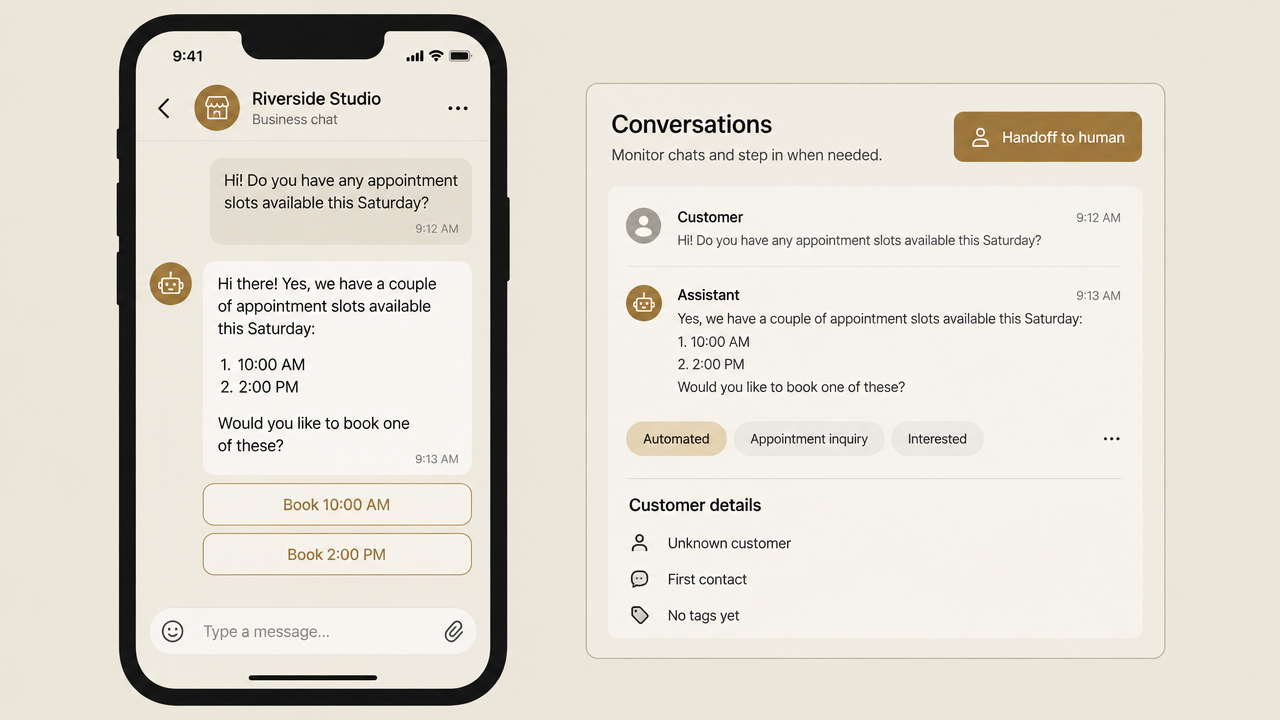
Your Chatbot at 2am While Everyone Sleeps
That is the whole point of the API tier. The messages keep arriving after hours, on weekends and during your busiest clinic morning, and the bot answers every one of them at the same speed. The lead that would have waited until Monday gets qualified overnight and lands on the right desk with context attached.
 GIF
GIFHow Creative Hauz Builds WhatsApp Chatbots for Service Businesses
Here is the honest version of everything above: the API is powerful, and it is also a lot to wire up and maintain. That is exactly the gap Creative Hauz fills. Creative Hauz builds end-to-end WhatsApp AI chatbots using the Meta WhatsApp Cloud API, n8n for workflow automation, Groq (Llama 3.3-70b) for the AI layer, and Supabase for persistent conversation memory. The result is a chatbot that remembers context across sessions, not just within a single thread. The conversational sales agent (persona Aria) handles customer queries, qualifies leads, and escalates to a human agent when a conversation needs one. For a clinic that means appointment requests answered at midnight. For a law firm, intake questions handled before the first consultation. For a real estate team, buyer qualification running around the clock. The difference is done-for-you: Creative Hauz builds and deploys the whole system, so you never touch webhooks, template approvals or AI prompting. The outcome is 24/7 automated customer engagement, response time reduced to zero, and 15+ hours a week won back for your team.
Where to Start: A Practical Path for Service Businesses
The right first move depends entirely on where you are today. Solo owner under 50 chats a day: the free WhatsApp Business app. Small team needing multiple agents: the WhatsApp Business API via a BSP. Want 24/7 auto-response and lead qualification: the API plus a chatbot layer. No technical team to build or maintain it: a done-for-you build. Just need broadcast messaging: the API with approved templates. The honest reality is that the API is not plug-and-play. Between business verification, template approval, opt-in handling and quality-rating maintenance, DIY turns into a part-time job fast. If you have the technical bench to build and babysit it, a BSP dashboard works. If you would rather have the system arrive finished, a done-for-you build gets a clinic, firm or agency to production without the platform-hopping. Start with the tier that matches your volume today, and move up the stack the moment the manual copying and pasting starts eating your day.
 GIF
GIFFrequently Asked Questions
What is the main difference between WhatsApp and WhatsApp Business? WhatsApp is a personal messaging app; WhatsApp Business adds a business profile, product catalog, automated greeting and away messages, and quick replies. The core messaging is identical, but for automation or multi-agent access you need the separate WhatsApp Business API. Is the WhatsApp Business API free? No - Meta charges per delivered template message as of July 2025, with marketing messages at $0.025 to $0.14 and utility messages at $0.004 to $0.05. The first 1,000 customer-initiated service conversations each month are free globally, and BSPs then add their own fee. Do I need the API to create a chatbot? Yes. Chatbots need the API to send and receive messages programmatically; the free app does not support chatbot integration. Once API access is live, the bot itself can be connected in as little as 30 minutes, though conversation design and template approval take longer. Can you create a free WhatsApp chatbot? The bot logic can be built at low or no cost using tools like n8n, but you cannot avoid the API and its per-message costs. Some BSPs offer free tiers for low-volume testing; for production, expect Meta fees plus a BSP or hosting fee. What should a chatbot not automate? Do not use the 24-hour service window for marketing or authentication templates. Unsolicited outbound marketing requires pre-approved templates sent only to opted-in users, and automating upsells inside an active support thread violates WhatsApp's usage policy. Are WhatsApp chatbots safe? Yes, when built on the official API. All messages use end-to-end encryption, which applies to bot-handled conversations too, and using an official BSP keeps your number compliant and protects its quality rating.
Putting It Together
The takeaway is simple: WhatsApp Business, the WhatsApp Business API and WhatsApp chatbots are three tiers of the same stack, not three names for one thing. The free app suits solo owners, the API unlocks automation and multiple agents, and a chatbot lives on top of the API to work around the clock. The honest reality check is that the API rewards you with real free volume and 95-plus percent open rates, but it demands setup, template approval and ongoing maintenance that a busy clinic or firm rarely has time for. That is where a done-for-you build changes the math: Creative Hauz builds and deploys your WhatsApp AI chatbot end-to-end, so your team gets 24/7 automated engagement, response time reduced to zero, and 15+ hours a week back.